Video style · Hologram HUD
Product spec videos as a hologram scan.
A product spec video walks through a product's parts and the number that makes each one matter: range, torque, stopping distance, price. In the hologram HUD style the object is scanned into a glowing wireframe, a target box locks onto each part, it opens in a local exploded view, and the value rolls from scrambled glyphs into the real figure.
- Example
- Volt Spec Scan, 0:39
- Drawn with
- Code, no footage
- Works on
Last updated
The example, moment by moment
What happens in Volt Spec Scan
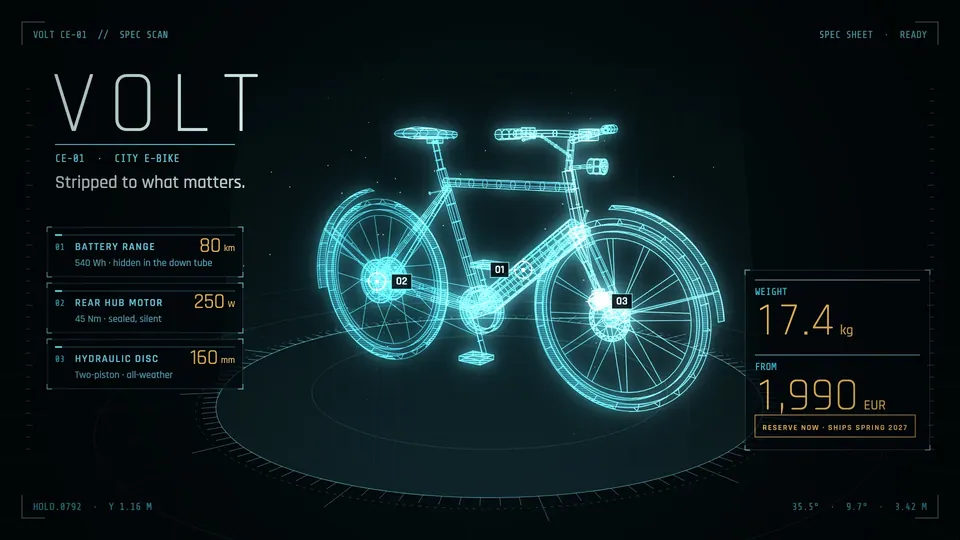
A fictional city e-bike is scanned into a glowing wireframe; target boxes lock onto the battery, motor and brakes one at a time, each opens to show the part that makes its number true, and the whole thing lights up into a solid hologram and a spec sheet.
-
A scan plane rises through an empty projector pad and grows the e-bike as a wireframe of light, while the camera cranes down to eye level.
-
The product name rolls in like a value, then its code, category and tagline. The title is part of the scene, not a card.
-
Target lock on the battery: the box snaps to fit, the camera pushes in, the cover slides along the down tube, the cells glow, and 80 km rolls in amber.
-
A whip to the motor and an orbit around its axis while it splits into cap, rotor and stator, the rotor and stator turning against each other.
-
Pull back to the whole bike with a loupe on the brakes, so the wide view and the detail share the screen.
-
One beat of true silence, then the wireframe ignites into a solid hologram on a full turntable and settles into a spec sheet.
What the hologram HUD look is made of
- 01
A wireframe of light
The subject is always lines on a near-black stage above a round projector pad, never a rendered object. Depth fog dims the far edges and two glow passes soften the near ones.
- 02
Three layers of depth
A background dot grid, the subject with its pad and floor, and a foreground HUD of corner brackets, rulers and status text, each moving at its own parallax.
- 03
Target lock and leader
An oversized box snaps to fit a part in a fifth of a second and flashes white for three frames. A leader line pulls out to a card, and the camera follows the box.
- 04
Rolling values
Numbers lock right to left from scrambled glyphs in a monospaced face and turn the accent colour on the exact frame they become true.
- 05
Local explode
The shell slides along its own assembly axis while the contents stay in place and glow, so every number has a visible cause.
- 06
One hue, one accent
A cold hue for every line, plate and fill; a warm accent spent only on locked values. White means heat and happens for one frame at a time.
Best for
- Spec walkthroughs with two to five parts
- Launch and pre-order videos for hardware
- Trade-show and showroom loops without voice
- Upgrade videos, old value dim and new value in accent
- Assembly-order explainers
Not for
- Products without parts: software, services, food
- Soft, warm or handmade brands
- Long narration
- Anything that must look photographic
Scene outline
How to make a product spec video in this style
Fill-in scripts: listicle video , comparison video , product spotlight video
- 1 0–4 s
Scan-in
A scan plane grows the object from the pad as the camera cranes down. Nothing is labelled yet.
- 2 4–8 s
Name and tagline
Roll the product name in like a value, then code, category and one line. Hold the title at least five seconds.
- 3 8–16 s
Part one, slow
Lock, push in, open the shell, light the inside, pull a leader, roll the number. The first spec gets the most time.
- 4 16–28 s
Parts two and three
Whip to the next box. Orbit axial parts around their axis and use a loupe for small ones. Dock each finished value in a side rail.
- 5 28–34 s
Ignition
One beat of silence, then the wireframe lights into a solid hologram on a full turn. Once only.
- 6 34–40 s
Spec sheet
Settle into a near-static lockup with every value, weight, price and the call to action, held at least three seconds.
When a datasheet should move
Specifications are the least watched part of a product page and the most decisive. A spec video exists to make three or four numbers memorable: how far it goes, how fast it stops, what it weighs, what it costs. The hologram HUD style earns those numbers. It finds the part, opens it, shows the component that makes the figure true, and only then rolls the value in. A viewer who sees the battery cells glow before reading 80 km believes the 80 km.
The style is a scene style, built to do a practical job for any object with parts: a bike, a coffee grinder, a drone, a running shoe. It is weak where the product has no parts. Software, services and food have nothing to lock onto, and a wireframe of a sandwich says nothing.
Writing for the HUD
Start from the order of information, not the shots. Name and tagline, then one spec per part in the order a buyer would ask, then weight and price, then the call to action. Give part one three bars and the others two. Each value stays on its big card for at least two and a half seconds before docking, so by the end every number is on screen together.
Write the voice lines short and calm. Part one’s line can run almost five seconds; later lines under three and a half, or the subtitles collide with the next lock. Numbers are set in a monospaced face so rolls never jitter, and the decimal point is a small square, because a glowing dot reads as a comma.
Spend the accent carefully. One cold hue carries every line, plate and fill. The warm accent appears only on a value at the frame it locks, and nothing else uses it. A brand mark may keep its own colour as the single exception.
Sound
Music first, on a grid where one bar is one information beat, so every lock lands on a downbeat. Add a layer per part, decelerate before the high point, hold one beat of true digital silence, and spend the drop on ignition. Foley follows the material: servo slides and hydraulic hiss for machines, sines and FM blips in the key for light.
How OpusCar fits
OpusCar renders scenes from code, so the wireframe, the target boxes and the rolling numbers come from the product’s data rather than a motion designer’s timeline. Bring the parts, their values and the tagline. The script, voiceover, animation, captions and posting schedule follow in one flow, and a product line gets the same HUD on every model.
Where a product spec video earns its place
Product spec walkthrough FAQ
What is a product spec video?
A product spec video is a short video that presents a product's key specifications one part at a time, each with a label, a value and a unit, so a viewer takes in three to five facts in under a minute. It sits between a launch teaser and a datasheet, and it is the video a buyer watches second.
Why a hologram HUD for specs?
The style treats every number as computed data: the part is located, opened, and the value is rolled in on screen. That reads as proof rather than a claim. It also gives each spec its own moment, with the camera following the target box from part to part, and finished values stay docked on screen until the end.
How many specs fit in one video?
Two to five. The first part gets the most time, the others two bars each, and finished values dock into a side rail so every spec stays visible for the rest of the video. With more than five the rail runs out of room and the lines start to collide.
Does it need a voice?
No. A loop-screen version with no voice runs 20 to 30 seconds and returns to its first frame, which suits showrooms and trade-show stands. With a voice, keep the lines calm and short and let the lock sounds land on the beat under them.
More video styles
All 11 styles-
 0:32 Glass product render
Product launch
Aura: Hear the Light: A fictional pair of glass earbuds in a pebble-shaped case is lit from outside in the dark, opened, seen through, taken apart, and snapped together on the drop, when sound becomes light inside the glass. See the product launch video -
 0:59 Isometric infographic
Process explainer
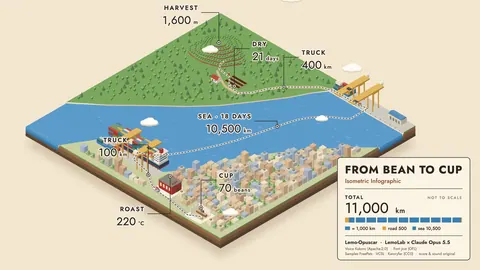
From Bean to Cup: One coffee bean travels from a hillside farm to a cup in a single isometric take: every step is a station on one board, the route is a dashed line, and every number is built from icons. See the process explainer video -
 0:55 16-bit pixel RPG
Pixel art recap
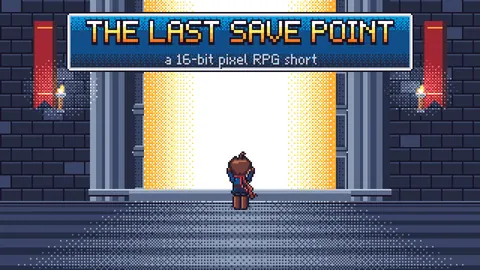
The Last Save Point: At the final boss door, a hero saves the game, and the save screen replays the whole journey: memories drawn in fewer colours, a name greyed out in the party list, and full colour flooding back before the last slot is written. See the pixel art video
Sign up
Make your first ten videos this week.
Sign up with your email and we’ll get you set up with OpusCar.
We’ll only email you about your account. No spam.